
Editor’s Note:
This article was updated to reflect our experience using TuneUp Utilities as a long-term computer maintenance solution.
After blogging for several years, my laptop had seen a lot of action — photo editing, social media scheduling, uploads, downloads, and countless programs running in the background. Over time, I noticed it becoming increasingly sluggish. Like many people, I assumed the problem was down to the sheer number of photos and files stored on it, so my husband bought me an external hard drive.
I transferred everything across… and was disappointed to find the laptop was only marginally faster. At that point, I resigned myself to the idea that my computer was nearing the end of its life and that I’d need to start saving for a replacement.
That’s when I was asked if I’d like to try TuneUp Utilities, a PC optimisation and cleaning program designed to remove clutter, free up memory, and improve overall system performance. With a recommended retail price of £29.99, it promised to restore speed and efficiency across laptops, tablets, and PCs.
First impressions (and a small hiccup)

I ran TuneUp for the first time one evening and, initially, wasn’t impressed. It seemed to be taking forever. The software literature suggested the process should take under 25 minutes, but after a couple of hours I felt deflated.
The problem turned out not to be TuneUp at all — my laptop was set to hibernate after 15 minutes of inactivity, meaning the program never had the chance to finish. Once I adjusted my power settings and ran it again, TuneUp completed its work in just 20 minutes.
The results were eye-opening.
What TuneUp found on my laptop
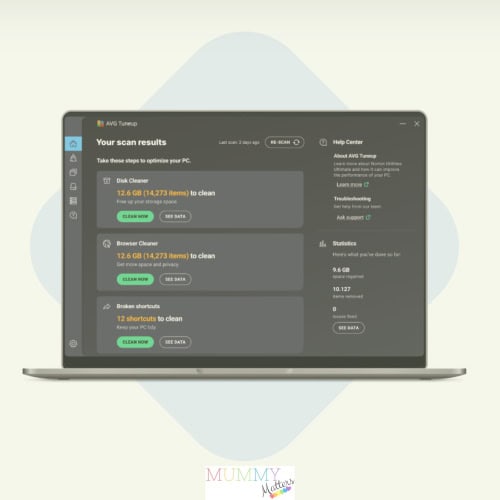
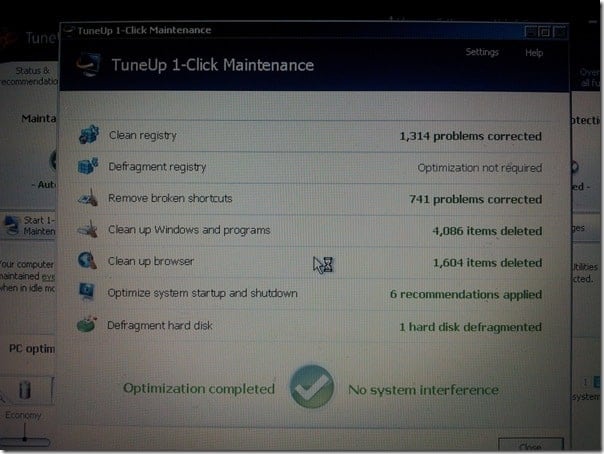
The error report revealed an alarming number of issues — far more than I expected. Seeing everything laid out so clearly really brought home how much unnecessary clutter had built up over the years.
One thing I particularly appreciated was how clearly TuneUp explained exactly what it was doing before asking me to confirm any actions. This gave me the confidence to proceed without worrying that I might accidentally delete something important.
In addition to clearing unwanted data, TuneUp highlighted how many programs were running silently in the background. I hadn’t realised that software could be active even when it wasn’t open or being used. For example, I own several digital cameras, each with its own software package. Even if I hadn’t used a camera in months, its software was still running in the background, slowing everything down.
In total, 127 programs were set to launch automatically when my laptop started. After reviewing them, I reduced that number to just 14 — keeping only what I genuinely needed.
The difference it made
Once the clean-up was complete, I restarted my laptop and immediately noticed the improvement. It loaded in half the time.
I ran TuneUp again out of curiosity, and this time it detected just 24 minor issues, completing the scan in under a minute. My laptop genuinely felt as good as new.
One of the biggest bonuses is that TuneUp continues to maintain the system automatically, running routine maintenance every few days while the computer is idle. It’s reassuring to know everything stays clean and optimised without me having to think about it.
My only concern now? That my laptop might be working faster than I can keep up with.
Top 5 Reasons to Spring Clean Your Computer
1. Security
Windows systems store temporary files and logs, some of which can contain sensitive information such as passwords. Regular clean-ups help protect your privacy.
2. Reliability
System crashes and the dreaded “blue screen” are often linked to excess junk files. Clearing them won’t guarantee a crash-free computer, but it significantly reduces the risk.
3. Better web browsing
Browsing the internet builds up caches, cookies, and clutter over time. Removing these can noticeably improve browsing speed.
4. Disk space
Many modern laptops and tablets have limited storage. Even small amounts of unnecessary data can slow performance. Cleaning your system frees up valuable space.
5. Performance
By removing unused files, apps, and background processes, TuneUp gives your computer a genuine performance boost — without needing new hardware.
Final thoughts
If your computer has gradually slowed down and you’ve been blaming age or storage alone, it may simply need a proper digital spring clean. My experience with TuneUp showed just how much difference the right software can make — and it saved me from replacing a laptop that still had plenty of life left in it.